key vs code vs keyCode: what is the difference?
All three live on keydown and keyup events, and each answers a different question. Here is the same A key pressed two ways:
| event.key | event.code | keyCode | |
|---|---|---|---|
| What it is | The character or function name of this press | The physical key's position | An old numeric code |
| Changes with Shift, layout or IME? | Yes | No | Partly, and differently per browser |
| Press A | a | KeyA | 65 |
| Hold Shift, press A | A | KeyA | 65 |
| Specification | W3C UI Events KeyboardEvent key Values | W3C UI Events KeyboardEvent code Values | Only the legacy section of the UI Events spec |
Code names describe positions on a US keyboard, not what is printed on your keycap. MDN's example: on a French AZERTY keyboard, the key labeled A reports the code KeyQ (that is where Q sits on a US keyboard), while its key is a. So show key when you tell users which character they pressed, and use code for game controls that should stay in the same place whatever the layout.
Key code list for all 104 keys (click to copy)
The eight tables below list all 104 keys on a full-size US keyboard. That includes every key on the map in our keyboard tester, plus Print Screen, Scroll Lock and Pause, which aren't shown on the map. The key column is the value with no modifier held, and the With Shift column is the key for the same press with Shift held. keyCode comes from the legacy section of W3C UI Events; for keys the spec does not list, it is the value MDN's table gives for Chrome on Windows. Browsers and systems that report something else are listed under the number.
Click any value to copy it, or use the button above each table to copy the whole group as TSV, ready to paste into a spreadsheet. The Space bar's key is a single space character, so the table and the copied text wrap it in quotes to keep it visible. The copied " " is already a JavaScript string. Just paste it right after event.key ===. No extra quotes needed.
Letter keys A to Z
key is the lowercase letter, or uppercase with Shift held. code is Key plus the uppercase letter. keyCode is always the ASCII code of the uppercase letter, from 65 for A to 90 for Z.
| Key | event.key | With Shift | event.code | keyCode |
|---|---|---|---|---|
| A | ||||
| B | ||||
| C | ||||
| D | ||||
| E | ||||
| F | ||||
| G | ||||
| H | ||||
| I | ||||
| J | ||||
| K | ||||
| L | ||||
| M | ||||
| N | ||||
| O | ||||
| P | ||||
| Q | ||||
| R | ||||
| S | ||||
| T | ||||
| U | ||||
| V | ||||
| W | ||||
| X | ||||
| Y | ||||
| Z |
Number keys 0 to 9 (top row)
code is Digit plus the number and keyCode is the digit's ASCII code, 48 to 57. The same number on the numpad has the same key but a different code and keyCode (see the last table).
| Key | event.key | With Shift | event.code | keyCode |
|---|---|---|---|---|
| 1 | ||||
| 2 | ||||
| 3 | ||||
| 4 | ||||
| 5 | ||||
| 6 | ||||
| 7 | ||||
| 8 | ||||
| 9 | ||||
| 0 |
Escape, F1 to F12, Print Screen, Scroll Lock and Pause
For F1 to F12, key and code are both F plus the number, and keyCode runs from 112 to 123. Laptops often need Fn held to send an F key, and Fn itself is usually handled by the keyboard hardware without a separate code.
Print Screen, Scroll Lock and Pause sit to the right of F12. The code spec groups them in the same function section. Their key and code names match, and their keyCode values are 44, 145 and 19. MDN's table points out two quirks. On Windows, Print Screen fires only keyup, with no keydown. On a Mac, these three PC keys act as F13, F14 and F15, so Chrome and Safari report 124, 125 and 126 instead. Our keyboard map doesn't show these keys. Press one and check Recent browser events.
| Key | event.key | event.code | keyCode |
|---|---|---|---|
| Esc | |||
| F1 | |||
| F2 | |||
| F3 | |||
| F4 | |||
| F5 | |||
| F6 | |||
| F7 | |||
| F8 | |||
| F9 | |||
| F10 | |||
| F11 | |||
| F12 | |||
| Print Screen | Chrome and Safari on Mac: 124; Chromium and Firefox on Linux: 42 | ||
| Scroll Lock | Chrome and Safari on Mac: 125 | ||
| Pause | Chrome and Safari on Mac: 126 |
Modifier keys: Shift, Ctrl, Alt, Windows and Command
The left and right keys share the same key value; only code tells them apart. keyCode mostly does not either, with the Windows keys in Chrome on Windows (91 and 92) as the exception. On a Mac, Command is Meta and Option is Alt. Many non-US layouts use the right Alt as AltGr, and then its key is AltGraph.
| Key | event.key | event.code | keyCode |
|---|---|---|---|
| Left Shift | |||
| Right Shift | |||
| Left Ctrl | |||
| Right Ctrl | |||
| Left Alt (Option on Mac) | |||
| Right Alt (Option on Mac) | |||
| Left Windows key (Command on Mac) | Firefox on Mac: 224 | ||
| Right Windows key (Command on Mac) | Chrome and Safari on Mac: 93; Firefox on Windows and Linux: 91; Firefox on Mac: 224 | ||
| Caps Lock |
Enter, Space and editing keys
The Space bar's key is a single space character, not Space; Space is its code. The key labeled Return on a Mac reports Enter for both key and code, and the key labeled delete in the main block of a Mac keyboard has the code Backspace.
| Key | event.key | event.code | keyCode |
|---|---|---|---|
| Backspace | |||
| Tab | |||
| Enter (Return on Mac) | |||
| Space bar | |||
| Insert | |||
| Delete | |||
| Menu key | Chrome and Safari on Mac: 0 |
Arrow and paging keys
Arrow keys use the same name for key and code. Their keyCodes are 37 to 40, in the order left, up, right, down.
| Key | event.key | event.code | keyCode |
|---|---|---|---|
| Up arrow ↑ | |||
| Down arrow ↓ | |||
| Left arrow ← | |||
| Right arrow → | |||
| Home | |||
| End | |||
| Page Up | |||
| Page Down |
Punctuation keys
Punctuation keys depend on the layout; this table is the US layout. Firefox reports a different keyCode for three of them: 59 for semicolon, 61 for equals and 173 for minus.
| Key | event.key | With Shift | event.code | keyCode |
|---|---|---|---|---|
| ` ~ | ||||
| - _ | Firefox: 173 | |||
| = + | Firefox: 61 | |||
| [ { | ||||
| ] } | ||||
| \ | | ||||
| ; : | Firefox: 59 | |||
| ' " | ||||
| , < | ||||
| . > | ||||
| / ? |
Numpad keys
A numpad digit has the same key as the top-row digit, 1, and only its code (Numpad1) tells them apart. keyCode runs from 96 to 105. The table shows values with Num Lock on. On a Mac keyboard this position holds the Clear key, which the spec says should also report the code NumLock.
| Key | event.key | event.code | keyCode |
|---|---|---|---|
| Num Lock | Mac: 12 | ||
| Numpad / | |||
| Numpad * | |||
| Numpad - | |||
| Numpad + | |||
| Numpad Enter | |||
| Numpad . | |||
| Numpad 0 | |||
| Numpad 1 | |||
| Numpad 2 | |||
| Numpad 3 | |||
| Numpad 4 | |||
| Numpad 5 | |||
| Numpad 6 | |||
| Numpad 7 | |||
| Numpad 8 | |||
| Numpad 9 |
With Num Lock off, the code stays the same but key and keyCode switch to the key's second function: 1 becomes End (35), 2 becomes ArrowDown (40), 0 becomes Insert (45) and the decimal point becomes Delete (46).
Why does the same key give a different key value?
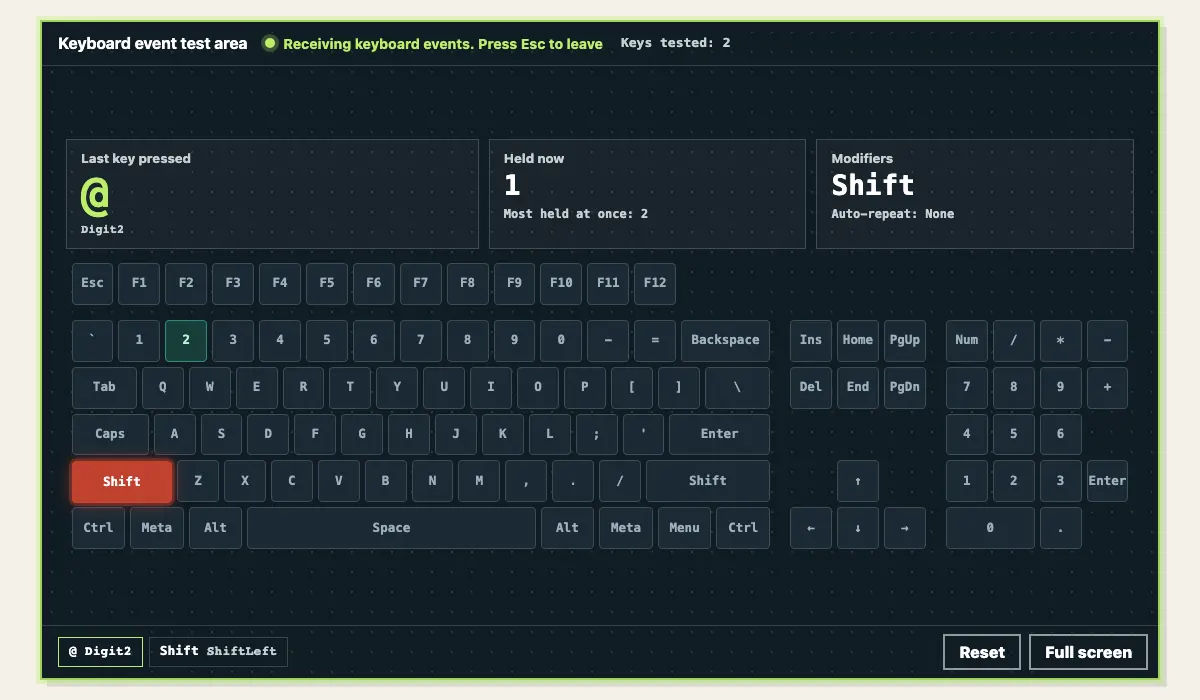
- Shift: MDN's example is Shift plus 2, which gives
@on a US layout and"on a UK layout. The code isDigit2on both. - Keyboard layout: layouts such as AZERTY and German QWERTZ put different characters on some positions. key follows the layout and code does not.
- Input methods: while an IME for Chinese, Japanese or Korean is composing, key events carry
event.isComposingset totrue, and keydown reports keyCode 229 (W3C UI Events). - Keys the system takes first: Fn, Alt+Tab, Cmd+Tab and shortcuts the browser reserves (such as Ctrl+W) are handled by the operating system or the browser, and our keyboard tester never sees them either.
The input method case is the one that bites: a user presses Enter to pick a character and your code treats it as submit. MDN recommends checking both conditions, because on the press that starts or ends composition, isComposing can still be false while keyCode is already 229:
input.addEventListener('keydown', (event) => {
  // An IME is still composing: this press picks a character, so skip it
  if (event.isComposing || event.keyCode === 229) return
  if (event.key === 'Enter') submit()
})keyCode is deprecated: what to use instead
MDN marks keyCode as deprecated and points to code (the physical key) or key (the character it maps to). When you rewrite old code, first decide which of the two you actually care about:
// Old: keyCode is deprecated
if (event.keyCode === 13) submit()

// You care what the press means: use key (both Enter keys match)
if (event.key === 'Enter') submit()

// You care where the key sits: use code (same key on an AZERTY keyboard)
if (event.code === 'KeyW') moveForward()Two things to watch while you migrate. First, key cannot tell the main keyboard from the numpad: both Enter keys report Enter, and only code separates Enter from NumpadEnter. Second, OSLeft and OSRight in older code or data are the old codes for the Windows keys. MDN notes they were used before Firefox 118 and Chrome 52; the names are now MetaLeft and MetaRight.
Look up any key in the keyboard tester
The tables show what the specifications and documentation say. To see what your own keyboard, layout and browser actually send, open the keyboard tester and press the key:
- Click the keyboard map (or Tab into the test area). The status line changes to Receiving keyboard events.
- Press the key you want to look up. Under Last key pressed, the large text is key and the line below it is code, and that key lights up on the map.
- Scroll to Recent browser events to see key, code and held modifiers for every keydown and keyup. Press Escape to leave the test area.