
Money and Work Calculators
The Office Life Calculator, formerly Calc Lab, does more than compound interest: calculators for saving, retirement, buying a home and workers' rights in Taiwan
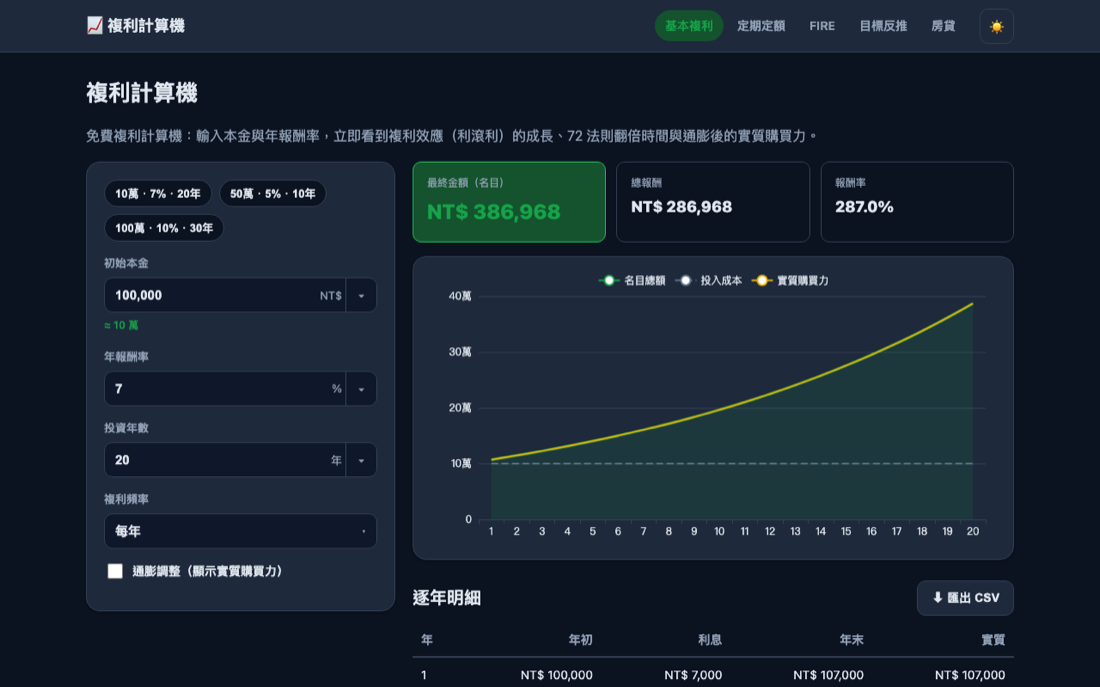 Tap the image to open the tool ↗
The site started as a compound interest calculator. In September 2026 it was renamed Calc Lab, because it had long since stopped being a single calculator, and later that month it took its current name, the Office Life Calculator (社畜人生計算機, the name you will see in the site header), which says who the calculators are for. Each of its pages answers a specific question: what a lump sum grows to in twenty years, what annual return your past investments actually earned, how long a retirement pot lasts, how much a subsidised first home loan payment jumps once the grace period ends, how many days of annual leave you are owed this year, what severance you are owed if you are laid off, what is left of a year-end bonus after tax and the health insurance premium, or how much labour and health insurance comes out of your pay each month. This page is a map of those tools. It points you to the right page for your question and adds a few things worth knowing before you read the results. The formulas, worked examples and official sources live on each tool page, so they are not repeated here.
The calculators themselves are in Traditional Chinese. Several of them, such as the housing loan subsidy, the labour pension, annual leave, overtime pay, severance pay, the year-end bonus, labour and health insurance premiums and the tax deadline calendar, follow Taiwan rules, so they are most useful if you live or work in Taiwan. The compound growth, recurring investing, goal, annualised return, FIRE and withdrawal pages work for anyone, whatever the currency.
Open the Office Life Calculator ↗
Start with the question you want answered
| What you want to know | Use this page |
|---|---|
| What does a lump sum grow to if I leave it alone? | Compound interest |
| What does a fixed monthly amount add up to over time? | Recurring investing |
| How much a month do I need to reach a target in ten years? | Goal back solving |
| What annual return did my investments actually earn over these years? | Annualised return |
| How much do I need before I can stop relying on a salary? | FIRE |
| If I withdraw a fixed amount each year, how long will the money last? | Retirement withdrawals |
| What do voluntary labour pension contributions save in tax, and what will the account hold? | Labour pension |
| What is the monthly mortgage payment, and how do the two repayment methods compare? | Mortgage |
| What will I pay under the subsidised first home loan, before and after the grace period? | First home loan subsidy |
| What is this floor area in square metres, and what is the price per unit? | Area converter |
| How many days of annual leave do I have, and how do the two counting systems differ? | Annual leave |
| How much overtime pay am I owed for working late, on a rest day or on a national holiday? | Overtime pay |
| If I am laid off, what are my severance pay, pay in lieu of notice and pay for unused leave? | Severance pay |
| How many units of old-scheme pension does my service earn, and what is it worth? | Old-scheme pension |
| What is my year-end bonus for the part of the year I worked, and what is left after tax and the health insurance premium? | Year-end bonus |
| How many days of marriage, bereavement, family care or maternity leave do I get under Taiwan rules, and are they paid? | Leave days |
| Which insurance bracket does my salary fall into, and how much labour and health insurance do I and my employer pay each month? | Labour and health insurance premiums |
| When are the 2027 deadlines for withholding tax, withholding statements, business tax and annual returns, once weekends and holidays are taken into account? | 2027 tax deadlines |
What each calculator does
Saving and investing
- Compound interest: enter a starting amount, an annual return and a number of years, choose compounding from yearly through daily to continuous, and switch on the inflation adjustment to see the result in today's purchasing power. It has a year by year table and CSV export, and some inputs are kept in the URL so you can share the same calculation.
- Recurring investing: models a fixed monthly contribution over the long run, with an optional yearly increase, contributions at the start or end of each period, and inflation adjustment. It includes an interactive chart, a yearly table and CSV export.
- Goal back solving: set the target first, then solve for one of three things: the monthly contribution, the number of years, or the annual return you would need.
- Annualised return: the opposite direction to goal back solving. It works out what an investment that has already happened actually earned. CAGR mode takes the starting and ending amounts and dates and finds the smoothed annual rate. XIRR mode takes each dated contribution and withdrawal and solves for the annualised internal rate of return, with a discounting breakdown per entry and an XNPV check. When a set of cash flows has no answer or more than one, it tells you rather than picking one. You can copy a summary or export CSV, and the dates and amounts you enter are never written into the URL.
Retirement
- FIRE: from your current assets, monthly contribution and expected yearly spending in retirement, it works out the amount you need for financial independence and how many years it takes at your current pace, with inflation adjustment and a yearly breakdown.
- Retirement withdrawals: the other end of the plan. Enter the starting balance, the yearly withdrawal and a return, and see how many years the money lasts and in which year it runs short. Withdrawals can rise with inflation.
- Labour pension: uses Taiwan's monthly contribution wage table to split employer contributions from voluntary employee contributions, estimates the income tax the voluntary part saves that year, and projects the account balance at claiming age, with official sources and a check date.
- Old-scheme pension: the pension for service under Taiwan's pre-2005 scheme (Article 55 of the Labor Standards Act). Enter a hire date, a retirement date and one month of average wages to get the units and the amount, with the forty-five-unit cap applied and each retirement condition in Articles 53 and 54 marked as met or not. Service preserved after switching to the new scheme is covered too, and the figures were checked against the ministry's own calculator.
Buying a home
- Mortgage: monthly payment and total interest, comparing equal payments with equal principal repayment, with a grace period, a two stage rate and a yearly amortisation table.
- First home loan subsidy: follows the year by year subsidy structure published by Taiwan's Ministry of Finance, splitting the loan into its grace and repayment stages and showing the payment, total interest and interest saved at each stage. The base rate is adjustable.
- Area converter: converts between ping, square metres, square feet and the traditional land units jia and fen, works back from length times width, and gives the total price and the price per ping and per square metre.
- Mortgage lending cap: under the central bank's selective credit controls, how much you can borrow depends on how many homes already carry a mortgage in your name and on the price of this one. Enter the price and that count, and it gives the regulatory loan-to-value cap, the cash you need up front and the monthly payment if you borrow the maximum, including the luxury-housing thresholds of NT$70 million in Taipei, NT$60 million in New Taipei and NT$40 million elsewhere, and the 18-month exemption for people moving house who sign the undertaking. Where no official formula exists for a tax base, or no official ceiling for a fee, the page leaves it blank rather than guessing, and simply omits it if you do not fill it in. Compiled from the central bank rules and its Q&A, with the effective date and a check date.
Workers' rights
- Annual leave: from your start date and the counting method, it works out your leave entitlement under both the anniversary year and the calendar year systems, when it is granted and when it must be taken, showing the formula used by the Ministry of Labor's own calculator, a six year schedule and official sources.
- Overtime pay: for monthly or hourly paid workers. Enter your total monthly wage or your agreed hourly wage, then add each overtime entry: extra hours on a working day, a rest day or a national holiday (a day of annual leave worked counts the same way). For monthly pay it also covers a regular day off suspended because of a natural disaster, incident or emergency. Time counts to the minute, and each entry shows its rate tiers, the formula and the unrounded amount. It has a rate reference table, a reminder of the monthly overtime cap and notes on how it differs from the Ministry of Labor's overtime calculators. The FAQ explains where the 1.34, 1.67 and 2.67 rates come from and whether working on a typhoon day earns overtime pay, and you can copy a summary or export CSV.
- Severance pay: from the termination date, the hire date and either a monthly salary or the wages for each of the last six months, it works out the average monthly wage and severance under the new and old pension systems, including old system service carried over into the new one. Add the notice days given and your unused annual leave, and it also works out pay in lieu of notice and pay for unused leave, along with the payment deadline. It shows the base units, the formula, how it differs from the Ministry of Labor's severance calculator and official sources.
- Year-end bonus: enter what the bonus is based on, the number of months and the period you worked, and it pro-rates the bonus, checks whether it reaches the threshold for income tax withholding, works out the tax withheld and the supplementary National Health Insurance premium charged on the part above four times your insured amount, and shows what you take home. HR staff can paste a list of people to work out several at once. A year-end bonus is not required by law, so the number of months and the pro-rating follow your employer's rules. It lists its legal sources and a check date, and you can copy a summary.
- Leave days: pick a type of leave or the relative who died, and it lists the days, whether they are paid and the time limit for marriage, bereavement, sick, personal, family care and menstrual leave, plus maternity, prenatal check-up and paternity leave. Enter the marriage registration date to see whether the new 14-day marriage leave (from 1 October 2026), the transition rule or the old rule applies. Part-time hours are converted following the Ministry of Labor guidelines, and a kinship degree calculator is included. Each rule is labelled as statute, official interpretation, Ministry of Labor guidance or the site's own note, with official sources and a check date.
- Labour and health insurance premiums: enter a monthly salary, or the insured amounts from your payslip, and it looks up your bracket in the four official tables for labour insurance, occupational accident insurance, National Health Insurance and the labour pension. It then splits out what the employee and the employer pay each month for labour insurance, employment insurance, occupational accident insurance, the wage arrears fund, health insurance and the labour pension. You can choose part-time work, workers aged 65 or over, migrant workers, the number of health insurance dependants, and joining or leaving partway through a month. The combined bracket table can be downloaded as CSV or printed on A4, and the page also notes the rate changes already known for next year and which tables are still waiting to be announced. The bills from the Bureau of Labor Insurance and the National Health Insurance Administration are what count; the page lists official sources and a check date.
- Year-end party prize withholding: for companies running a year-end or spring party raffle, enter the market value of the prize and it works out whether tax has to be withheld, how much, how much the winner has to pay before taking the prize home, and which withholding statement to issue. It also estimates how much more the winner will owe when they file in May. Residents and non-residents, winners who are and are not the taxpayer, and the valuation of goods rather than cash are all handled separately. Every figure cites the article of the Income Tax Act or the withholding rate standards it comes from, with a check date.
- 2027 tax deadlines: a tax calendar for admin and accounting staff at small companies. It lists the 2027 deadlines (year 116 in the Minguo calendar) for the tax withheld each month, due by the 10th, filing and issuing withholding statements, business tax every two months, annual income tax returns in May and provisional tax in September. Each date is moved off weekends and holidays under Article 48 of the Administrative Procedure Act and the government office calendar, and the page counts the working days left until the next deadline. You can switch to a two month or full year calendar, print on A4, or tick the items you want and download an .ics file for your calendar app. The dates are worked out by the site from the law, so the Ministry of Finance and the National Taxation Bureaus have the final word; the page shows a check date and whether the Ministry has published its own calendar yet.
Which input moves the result most
The compound interest page already explains the formula and the rule of 72, so here is a different angle: take one scenario and change one input at a time. The baseline is NT$1,000,000 at 6% a year for 20 years, compounded yearly, which comes to about NT$3.21 million.
| Change one thing | After 20 years, about | Versus the baseline |
|---|---|---|
| Baseline: 6%, 20 years, yearly compounding | NT$3.21 million | |
| Leave it 10 years longer (30 years) | NT$5.74 million | NT$2.53 million more |
| Two percentage points more return (8%) | NT$4.66 million | NT$1.45 million more |
| Compound monthly instead | NT$3.31 million | NT$0.10 million more |
| Take off 2% inflation a year, in today's money | NT$2.16 million | NT$1.05 million less |
Three things stand out:
- Time matters most. Ten more years adds over a million more than two extra points of return. The return is the part you control least; time and the amount you put in are the parts you control.
- Compounding frequency barely matters. Monthly instead of yearly adds about 3%.
- Inflation takes about a third. NT$3.21 million on paper is about NT$2.16 million in today's money, so switch on the inflation adjustment or enter a conservative return for long plans.
The rule of 72 works in reverse
Dividing 72 by the annual return gives roughly the years it takes money to double. The same arithmetic works for inflation. At 2% inflation, 72 ÷ 2 ≈ 36, and purchasing power halves in about 35 years; at 3% it takes about 23 years. Cash left idle is compounding in the wrong direction, which is why the withdrawal page offers an option to raise withdrawals with inflation.
Three things to keep in mind when reading results
- Returns are assumed to be constant. The calculators that project forward assume the same return each year and ignore trading costs and tax, and the rate the annualised return page works out is likewise an average that smooths over the ups and downs. Real markets rise and fall, and the order matters, especially for withdrawals: a big fall in the first years of retirement does more damage than the table suggests.
- Policy based calculators depend on the date. The first home loan subsidy, the labour pension, annual leave, leave days, overtime pay, severance pay, the year-end bonus, insurance premiums and tax deadlines follow official rules, and rules change. Each page lists its official sources, and the pension, leave days, overtime, severance, year-end bonus, insurance premium and tax deadline pages show a check date. Before you apply for anything or raise it with your employer, go by the latest official announcement. The overtime and severance pages are unofficial estimates and do not rule on whether anything is lawful; for a dispute, contact your local labour authority or call the 1955 hotline.
- The numbers are for planning, not a promise. They help you compare options and get a sense of scale, and they are not investment or financial advice. See the Disclaimer.
Data and privacy
Everything is calculated in your browser, with no sign up, and the amounts you enter are not sent to a server to be stored. To make sharing easy, some inputs are written into the URL, and whether you share that URL is up to you. Fields such as salary, age, tax rate, pension balance, start and hire dates and overtime hours are deliberately kept out of the URL on the pages that use them, and the annualised return, year-end bonus, insurance premium and leave days pages keep everything out of the URL. On the tax deadline page, the items you tick stay out of the URL too, and the .ics file is created in your browser and downloaded straight away. See the Office Life Calculator's privacy policy (in Chinese) and this site's Privacy Policy.
Articles (in Chinese)
The Office Life Calculator also has an Articles section that explains common questions about Taiwan's labour rules, such as annual leave, overtime, severance and the minimum wage, along with a few money and mortgage ideas. Each article shows when it was last checked and links to the calculator that works out your own numbers. They are written in Chinese.
- Parental leave: how long you can take, and what the allowance pays
- Involuntary separation certificates, and how much unemployment benefit pays
- Notice periods: how many days to give, and what happens if notice falls short
- The 2027 minimum wage: NT$30,900 a month and NT$205 an hour
- Unused annual leave: pay for the days not taken, and settling up when you leave
- Severance pay on probation, with under a year's service, or when the company closes
- Time off in lieu of overtime: the ratio, the deadline and paying out unused hours
- Annual leave for part-time and student workers
- 2027 public holidays for workers, and substitute days off
- Voluntary labour pension contributions: applying online, changing and stopping
- The rule of 72: how long money takes to double, and when the rule is off
- Mortgage grace periods: how much the payment rises afterwards, and whether one can be extended
The full list, grouped by topic, is on the Office Life Calculator's articles page, where new articles are added as well.
Topics tied to a particular date, or to a policy that has just taken effect, are collected separately on the current-topics section: how pay is calculated for working on an election day, for instance. Nothing is removed once the date has passed, so it is still there the next time round.
Questions people ask
Why is it called the Office Life Calculator? This is its second name change. The site started as a compound interest calculator, and the mortgage, subsidised loan, pension, leave, overtime, severance and annualised return calculators were added over time. The name no longer matched what the site does, so in September 2026 it became 試算室, roughly "calculation room", or Calc Lab in English. Later that month it was renamed again, to 社畜人生計算機, the Office Life Calculator, a name that points to how the site is used: nearly all of its calculators answer questions that office workers run into, from saving part of a salary and paying off a mortgage to annual leave, overtime, severance, year-end bonuses and retirement. The single compound interest calculator on the home page keeps its name, and no address changed, so old bookmarks still work. The calculators all work the same way, a few inputs and a step by step result, so they share one site and one navigation, and the menu in the site header lists them all at once.
Where should I start? If you have not started saving, use recurring investing to see what a monthly habit adds up to. If you already have a target, use goal back solving. If you want to know what your past investments actually earned, use annualised return. If you are thinking about retirement, use FIRE to set the target and the withdrawal page to test how long it lasts.
Should I enter an annual or a monthly rate? Always the annual rate. Each calculator converts it to the right per period rate.
Once the numbers are settled, you can go back to all tools to find another tool.