
Device Tester Guide
See exactly which mouse events your browser receives
 Tap the image to open the tool ↗
When a mouse starts misbehaving, the hard part is not the repair. It is working out which layer is at fault. One press registering as two could be a worn switch, or it could be the double click speed setting in your operating system. Device Tester lays out the events your browser actually receives, so you can rule out half the possibilities first. This page does not repeat the on-screen instructions. It covers the two ways people use it most: checking a mouse when you buy it, and tracking down a problem step by step.
What the mouse test's four checks show
All four mouse checks are on one page, with no device permissions required, and nothing you do leaves the browser:
- Mouse Event Test: left, middle, right, Back and Forward, plus any other
buttoncode the browser reports, split into pressed, already tested and not detected, with a one click reset. Below it is a short list of recent events withbutton,buttonsand the click count. - Double-click Diagnostics: the interval in milliseconds between adjacent clicks of the same button, kept separate from the browser's native
dblclickevent. - Wheel Test: vertical and horizontal scroll direction along with the raw
deltaX,deltaYanddeltaModevalues. - Click Speed: 1, 5, 10 or 30 seconds, or a custom 1 to 60 seconds, with a live count, time remaining and CPS, and a local best kept per duration.
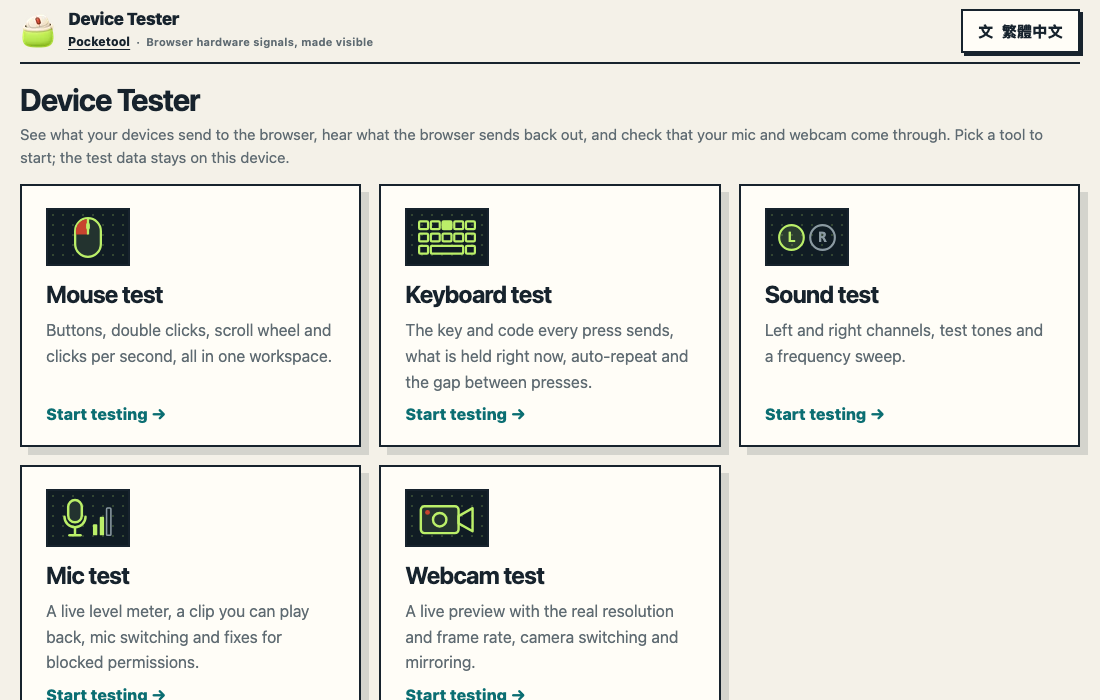
The same site also has keyboard, sound, microphone, webcam and touch screen tests
The Device Tester locale home is a tool index, the mouse test has its own address, and the same site has more tools:
- Keyboard test ↗: the
key,codeandkeyCodeevery press sends, which keys are held together, auto-repeat and the gap between presses. The keyboard map switches to a tenkeyless (TKL) or laptop layout and to Windows or Mac key names, and you can hold common combinations at once to check for blocked keys and ghosting. - Sound test ↗: plays the left and right channels separately so you can tell whether speakers or headphones are swapped, plays a steady tone at a frequency you choose, or sweeps across the audible range. It only sends sound out, never records, and needs no microphone or any other device permission. Turn the system volume down before the first tone. It does not measure loudness or frequency response, and it is not a hearing test.
- Mic test ↗: watch the level meter move as you speak, record up to 10 seconds and play it straight back, and switch between microphones. It asks for microphone access only after you press Start, and the recording stays in that tab and is never uploaded. If access is blocked or no device is found, the page has troubleshooting steps for each browser and phone.
- Webcam test ↗: a live preview with the resolution and frame rate your browser actually gets, camera switching, mirroring and a snapshot to check image quality. It too asks for camera access only after you press Start; the picture stays in your browser and nothing is recorded or uploaded.
- Touch screen test ↗: how many points your touch screen registers at once, where each one is, and the contact size and pressure the browser reports. Drag a finger over the whole test area and the squares you cross fill in, so a patch that never fills in is a place no touch arrived. It works on touch laptops, tablets and phones, needs no device permission and uploads nothing. An empty square only means no touch reached this browser window there; it is not a hardware verdict.
This page is about the mouse; the keyboard, sound, microphone, webcam and touch screen tests are explained on their own tool pages. The same site also has an articles section on checking and caring for a mouse and keyboard; when yours needs a clean, start with How to Clean a Keyboard and Mouse (and What Not to Use).
What it cannot do
The tool sees browser events, not hardware. A web page cannot read the state of a switch, a firmware version or a driver, so it cannot tell you a mouse is broken. What it can tell you is whether an action became an event, and how many.
- A side button that does nothing is not necessarily faulty. Back and Forward are often reserved by the browser or the operating system and never reach the page.
- No DPI, polling rate or latency figures. Event timing is affected by tab throttling, refresh rate and system scheduling, so those numbers cannot be derived reliably.
deltaYis not a count of wheel notches. Its unit depends ondeltaMode, and the conversion differs between browsers and operating systems.- No mouse results on a phone. Touches and taps are not counted as mouse input, so a phone or tablet needs a mouse attached. To test the touch screen itself, use the touch screen test above.
Buying a new or used mouse: a five minute check
Open the tool on a laptop when you unbox the mouse or meet the seller, and run through it once: in the Mouse Event Test every button should move from not detected to already tested, in Double-click Diagnostics slow single clicks should never add a very short interval, and in the Wheel Test the direction should match your hand. Screenshot anything that looks wrong, along with the browser and operating system. The full order of checks, how to test a held click and the sensor, and a checklist for buying used are in the Device Tester article How to Check a New or Used Mouse: A 5-Minute Checklist.
One press, two clicks: step by step
One press registering as two is the classic mouse failure, and it has several causes. Work through them roughly in this order:
- Look at the interval first. Press once in the double click area. If a pair of clicks appears with a very short interval and you are sure you pressed only once, it is worth digging further. Two deliberate clicks from a human hand are normally clearly further apart.
- Check whether it is one button only. The most used button, usually the left one, tends to go first. If both behave the same, suspect settings before hardware.
- Try another browser and disable extensions. Browser extensions and input settings can affect events, so switch off anything mouse related and test again.
- Try another computer. The same behaviour on two machines points at the mouse. Only on one machine, and that machine's mouse settings and drivers are the better suspect.
- Check the operating system double click speed. Windows has it in mouse settings, macOS in System Settings, Mouse. It changes when the system merges two clicks into a double click, but a web page cannot read that value, so the tool can only remind you to look.
The tool deliberately does not declare a pass or fail against a fixed millisecond threshold. It shows the numbers it observed. The same mouse produces very different figures in different hands, and a single cut-off would manufacture false alarms.
Before a repair or warranty claim
- Reproduce the problem a few times in the double click area and screenshot the intervals and the event list. The tool has no export, so a screenshot is the simplest record.
- Note the browser, the operating system, and whether it happens on another computer too.
- The manufacturer's own process decides the claim. The screenshots make the conversation more concrete; they are not a hardware test report.
Side buttons and the wheel
- Side button does nothing: try another browser, then another computer. The manufacturer's configuration software may also have remapped the side buttons, in which case the browser no longer receives Back and Forward.
- Wheel scrolls the wrong way: check the operating system's natural scrolling or scroll direction setting first. The tool shows the direction the browser receives.
- Wheel values differ between machines: the unit and scaling of
deltaYchange with the browser and operating system, so they cannot be used to compare scroll sensitivity across computers.
Reading clicks per second
CPS was always a number for comparing with other players, not a hardware specification.
- The first click starts the timer. The timer starts on the first physical left click in the test area, and that click counts. Touch, pen and keyboard input are ignored.
- Shorter durations flatter you. A one second sprint produces a high score easily; thirty seconds shows consistency. Compare the same duration.
- Records stay in your browser, stored per duration, and you can clear them. There is no leaderboard and no account.
What happens to your test data
Button codes, coordinates, event times, click intervals, wheel values and event history stay in the browser. Browser storage keeps only the best CPS score per duration, and the raw event history lives in memory until you leave or reload. If analytics is enabled, it records which pages you view, as on the other tools (the address without anything after #), and the tool itself sends only a fixed summary such as the language and which mode started or finished, never button codes, intervals, wheel values or scores. See the privacy section of the tool for details.
Questions people ask
Why does the page scroll when I press the middle button? Middle click triggers autoscroll by default in most browsers. The tool handles it inside the test area where it can, but behaviour differs between browsers. That is a browser level difference, not a mouse problem.
Will right click open the context menu? Only the Mouse Event Test area suppresses it, so you can test the button. Everywhere else it behaves normally.
Which browsers are supported? Chrome, Edge, Firefox and Safari. Ctrl-click on macOS, trackpads and horizontal wheels behave differently across them; where they do, the tool shows a status such as not detected rather than reporting a hardware fault.
With the mouse checked, try the Word and Character Counter, or go back to all tools.