Pocket Word King: Learn TOEIC Vocabulary Through Short Games
A little every day: five new words per three-minute level, along one fixed route
 Tap the image to open the tool ↗
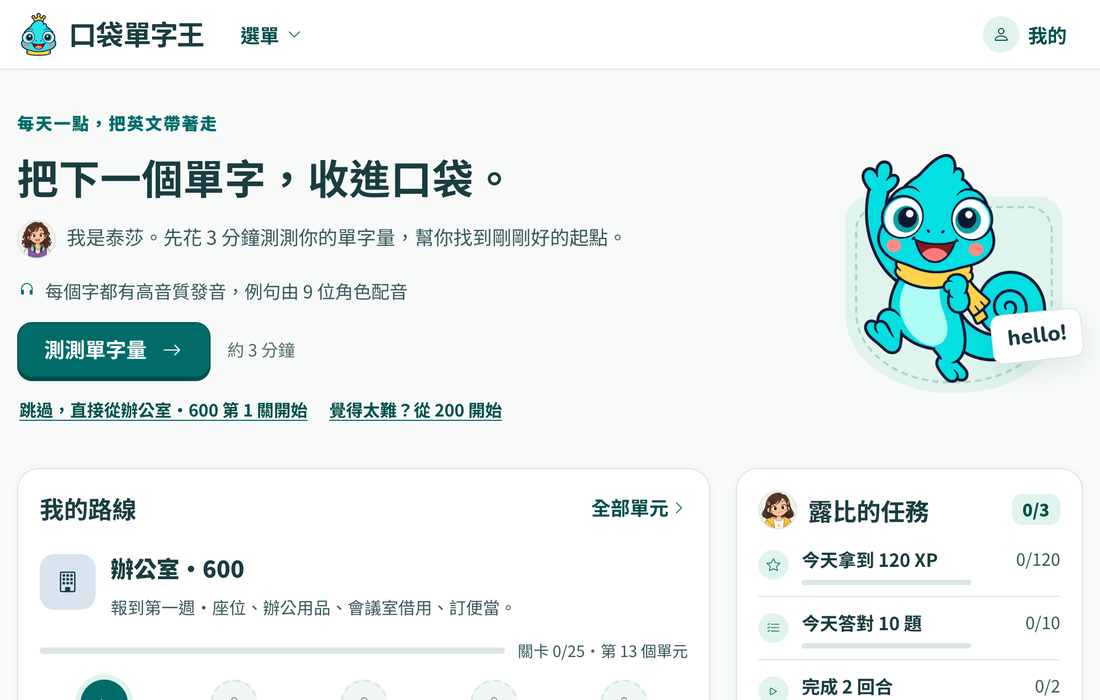
The hard part of learning vocabulary is rarely the memorising. It is coming back every day. A word book gets put down after a few pages, flashcards get dull, and what usually stops people is not knowing which words to study today. Pocket Word King, called 口袋單字王 in Chinese, splits common TOEIC words and phrases into short levels of five new words each, about three minutes per level, and lines them up along one fixed route. Open it and the first thing on the home page is how many levels to learn today and where the next one is; finish them and you are done for the day. Poko, the mascot, keeps you company as each new word goes into your pocket.
It is built for Chinese-speaking learners, and the interface is in Traditional Chinese only. Meanings and explanations are given in Chinese. This page names the main screens so you can find your way around.
Start practising (Chinese interface) ↗
What it does
- One fixed route: six workplace settings (the office, meeting rooms, business travel, finance, HR and sales) times six score bands (200, 400, 600, 730, 860 and 990) make 36 units in a single line. You start in the 600 band by default and unlock the next unit by passing each unit test. If it feels too easy, take a skip test from the list of all units.
- A daily plan (今日計劃): the home page has three parts. At the top is only today's work, normally two levels with ten new words, and one button that takes you straight to the next level. Below it, the route shows your current unit and its next few levels, and you can open a level to see its words first. Beside it are three small daily tasks, such as answering ten questions correctly or finishing two rounds, which open a daily chest when you complete them all, plus a weekly chest after ten tasks in a week.
- Many question types: the same word comes back from different angles, such as English to Chinese, Chinese to English, filling a gap in a sentence, choosing the right word form, phrase collocations, picking the meaning of a word you hear, spelling and putting a sentence in order.
- Games for a change of pace: a daily challenge, Blitz, Match, Rush Hour, Swipe, Spelling, Sentence Builder and a one minute true or false round. Some have a timed mode that keeps your best score.
- Review: review levels are mixed into the route, words you get wrong go into a mistakes list you can practise on its own, and you can pick your own words for a custom round.
- High quality audio: every word and phrase has synthesised speech, example sentences are voiced by nine characters, and playback can be slowed down.
- A vocabulary size test: about three minutes and 40 questions. First you mark which words you know (a few made-up words are mixed in), then answer multiple choice questions that adapt to your answers, and it suggests which score band to start from.
- A TOEIC mock test: after signing in you can take a mock test. Timing and how many times each recording plays are kept by the server, and answers with explanations come only after you hand it in.
- Collections: words you learn fill a word collection, with achievements and character stories to unlock.
Getting started
- On your first visit, the home page asks you to spend about three minutes on the vocabulary size test to pick a starting point. You can also skip it and start at the first level of the 600 band, or start from 200 if that feels too hard.
- After that, press the main button on the home page each day to go to the next level on the route. A level takes about three minutes: you meet five new words, then practise them with a few question types.
- Once today's two levels are done, come back tomorrow. If you want more, a unit page lets you take one extra level.
- To change level, sign in and pick another score band in the settings (設定). Difficulty can also be labelled with CEFR levels or Taiwanese, Japanese and Chinese exam levels instead of TOEIC scores. These are rough equivalents only.
Where your data is kept
You can play every game without signing in, but your progress stays only in that tab: closing or reloading it loses it, and the settings cannot be changed. Once you sign in with Google, your progress and settings are stored on the server, so you can pick up on another device. The site keeps only your Google account identifier, not your email address, name or profile picture. The TOEIC mock test always needs you to sign in.
After signing in, the settings page (設定) lets you export all your learning records, reset your progress or delete your account. Accounts unused for 180 days are deleted automatically. See the privacy policy for details.
FAQ
Does it cost anything? No. Everything is free.
Are the score bands real TOEIC scores? No. They only group words by difficulty, roughly matching the level of test questions where those words are common. They do not predict a test score. TOEIC® is a registered trademark of ETS, and this tool is not affiliated with ETS.
Is the audio recorded by people? No. It is high quality synthesised speech, with different character voices for the example sentences.
Is there an English interface? Not yet. The interface is in Traditional Chinese only.
For listening and speaking practice, try English Shadowing or Speak Cards English Practice, or go back to all tools.